Not the photos themselves. The meaning you had layered on top of them.
The Lock-in You Never Signed Up For
Every major photo app — iPhoto, Google Photos, Amazon Photos, OneDrive’s photo gallery — shares the same fundamental flaw: your enrichments live inside their proprietary system, not with your photos.
Albums, face recognition, comments, ratings, captions. All of it lives in a database you cannot see, cannot export in any useful form, and will lose the moment you switch providers or they decide to change their terms.
Have you ever tried migrating from Google Photos to Apple iPhoto — or the other way around? You can export the raw image files. But your albums come back as flat folders with mangled names. Your face groups are gone. Your carefully written captions vanish. The ratings you spent years applying disappear.
You didn’t lose your photos. You lost your library.
This is not an accident. Keeping your enrichments locked inside their format is how these platforms retain users. Your own curation becomes a switching cost they impose on you.
Extensibility: A Door That Was Never Opened
Beyond lock-in, there is a deeper problem: you can only do what the platform allows.
Want to tag photos by the lens you used, or by the mood of the shot? Not supported. Want to run your own face recognition model — perhaps one that works better for your family, or that respects your privacy requirements? Impossible. Want to call a third-party service to generate detailed scene descriptions, or to detect specific objects? You cannot.
These platforms embed AI deeply into their products, but only their AI, serving their purposes. You are a consumer of their intelligence, not an owner of yours.
The enrichment capabilities these apps provide — face grouping, scene detection, search — are genuinely useful. But you have no way to extend them, replace them, or combine them with tools that might serve you better.
AI Is in Your Photos App, But Not in Your AI Tools
Here is the sharpest irony of the current landscape.
The same period that saw AI assistants become genuinely useful — capable of answering questions, writing code, planning trips, analyzing documents — also saw photo management remain completely siloed from that intelligence.
Your AI assistant cannot browse your photo library. It cannot answer “show me all the photos from my trip to Lisbon in 2023” unless you manually upload files. It cannot help you build an album, surface a memory, or run a custom enrichment pipeline. The photos sit in one app; the intelligence lives in another; and the two never meet.
This is not a technical limitation. It is an architectural one. Existing gallery apps were not designed to be integrated. They are closed systems that happen to use AI internally, but expose nothing to the outside world.
A Different Starting Point
OuEstCharlie begins from a different set of assumptions.
Open standards, not proprietary databases. Every piece of metadata — face tags, album membership, captions, ratings, enrichments — is stored in XMP sidecars, an ISO standard (ISO 16684) that lives next to your photos as plain files. Lightroom can read it. Darktable can read it. ExifTool can read it. If you stop using OuEstCharlie tomorrow, your metadata is still there, in a format that will outlast any single application.
Built for AI integration from day one. OuEstCharlie is designed around the Model Context Protocol (MCP), the emerging standard for connecting AI assistants to external tools and data sources. Your photo library becomes a first-class capability that any MCP-compatible AI host — Claude Desktop, and others — can query, browse, and reason over. The AI is not embedded in the app; the app is embedded in the AI.
Extensibility through agents. Enrichment is not a fixed feature set — it is an open pipeline. Want to run a custom face recognition model? Write an agent. Want to call a third-party tagging service, or build your own? Write an agent. OuEstCharlie’s agent model means the system grows with what you need, not what a product team decided to ship.
Privacy preserved. Because the metadata lives with your files — on your drive, on storage you control — there is no mandatory upload to a cloud service to make enrichment work. Agents run where you choose to run them. Your photos are not the product.
The problem with today’s gallery apps is not that they do too little. It is that they do everything inside a box they own, and when you want to leave — or when you want to go further — the walls close in.
There is a better model. It starts with your data being yours: open, portable, readable by the tools you choose. And it ends with your photos being a living part of how you interact with AI — not a separate silo that AI cannot reach.
That is what OuEstCharlie is building.
Try It Today

Woof — the MCP app for OuEstCharlie — is available now as an early preview. Here is how to go from zero to browsing your library in three steps.
Step 1 — Install Woof
The easiest path is a single double-click. Download the latest ouestcharlie-woof.mcpb from the Releases page and open it. Claude Desktop will prompt you to install Woof in one click — no configuration file to edit, no terminal required.
If you prefer a manual setup or use a different AI client (ChatGPT Desktop, Goose, VS Code Copilot), add Woof via uvx:
{
  "mcpServers": {
    "woof": {
      "command": "uvx",
      "args": ["--python", "3.12", "--from", "ouestcharlie-woof", "woof"]
    }
  }
}
Step 2 — Point Woof at your photos
Once Woof is connected, tell your AI assistant where your photos live:
“Add a local backend to Woof pointing to /Users/your-name/Pictures”
Then kick off indexing:
“Index my local backend”
Woof reads your library as-is — no migration, no reorganization. It writes XMP sidecar files next to your originals (never touching the originals themselves) and builds a fast metadata index. Expect roughly 10–100 seconds per thousand photos.
Step 3 — Start searching
Once indexing is done, your library is fully accessible through natural conversation:
“Show me photos from last July”
“Pictures taken near Paris”
“How many photos do I have?”
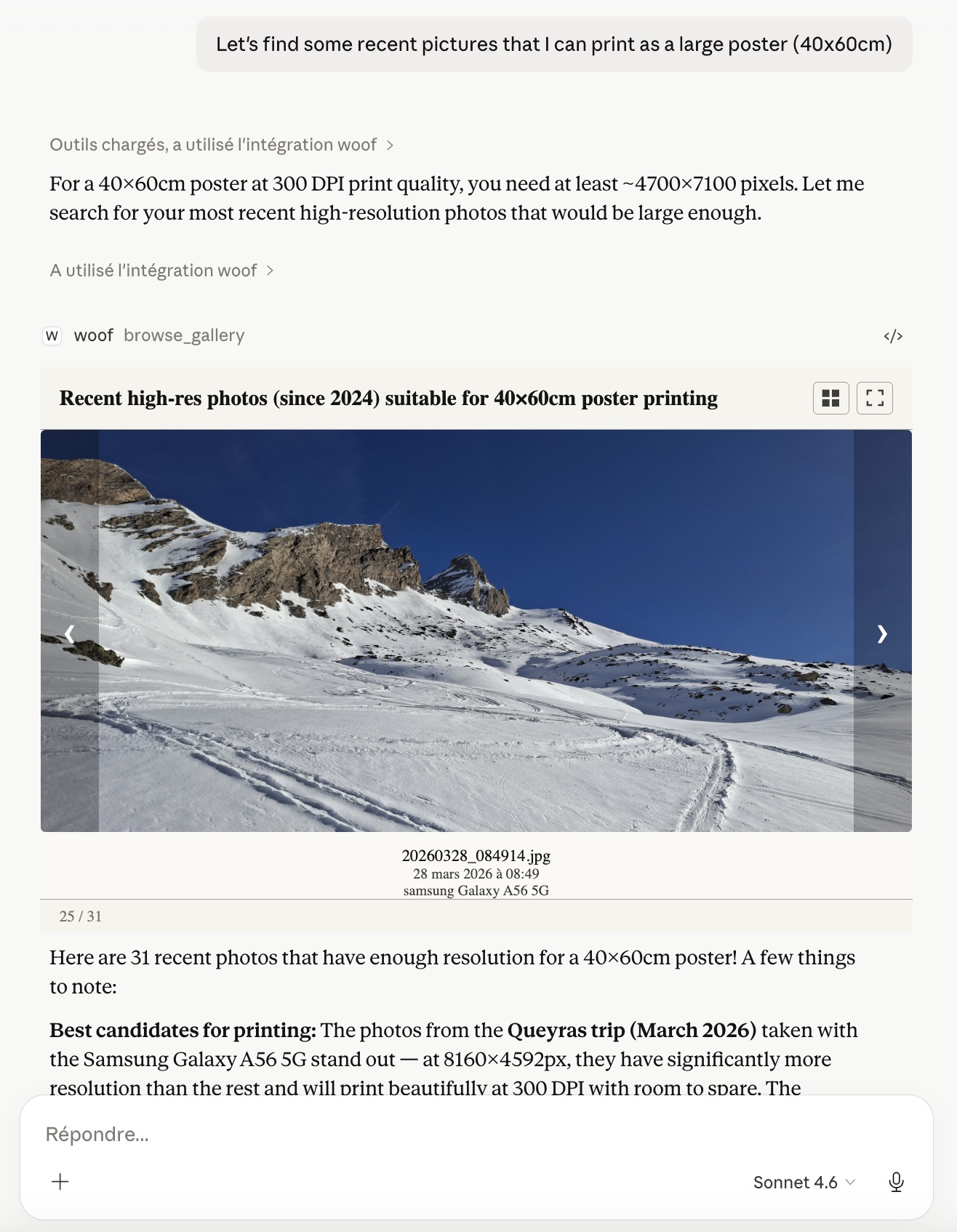
The gallery panel appears inline in your conversation with matching results. Your photos never leave your machine — only metadata and thumbnails travel to the AI assistant.
V1 supports local filesystems on macOS, Linux, and Windows, including folders synced from iCloud Drive, OneDrive, or Google Drive as long as files are locally available. Native cloud storage is on the roadmap for V2.
Get Woof on GitHub — see the README for full install and usage details.